Building Project Transparency Clients Love (Without Oversharing or Micromanaging)

At a glance
Share progress through agreed checkpoints and concise status updates. Clients need visibility into outcomes, decisions and timing; they do not need every internal note or unfinished experiment.
1. Why Clients Crave Transparency (Even If They Don’t Say It)
Most clients won’t outright say, “Hey, I’m nervous you’re going to disappear.” But many feel it—especially when working with freelancers remotely.
They’re trusting you with their business, brand, or goals. And if they don’t hear from you for a few days (or weeks), their imagination fills in the blanks: Are they still working on it? Did they forget? Is this going to be late?
Transparency eases that anxiety. It shows them you’re in control. It builds trust, reduces micromanagement, and turns what could be a nervous silence into confident calm.
But here’s the catch: **transparency isn’t the same as full access.**
2. The Problem with “Total Access”
You don’t need to open up your entire process like a live stream.
Too much transparency can backfire:
- Clients start giving feedback on internal drafts that weren’t ready
- They get confused about what’s done vs. what’s still in progress
- You feel like you can’t experiment or adjust mid-project without explaining every move
- You end up spending more time managing updates than doing the actual work
Freelancers often swing between two extremes: radio silence or total overexposure. The sweet spot is somewhere in the middle—a clear, curated flow of information that keeps clients reassured without pulling you into unnecessary oversight.
3. Signs You Might Be Oversharing (Or Undersharing)
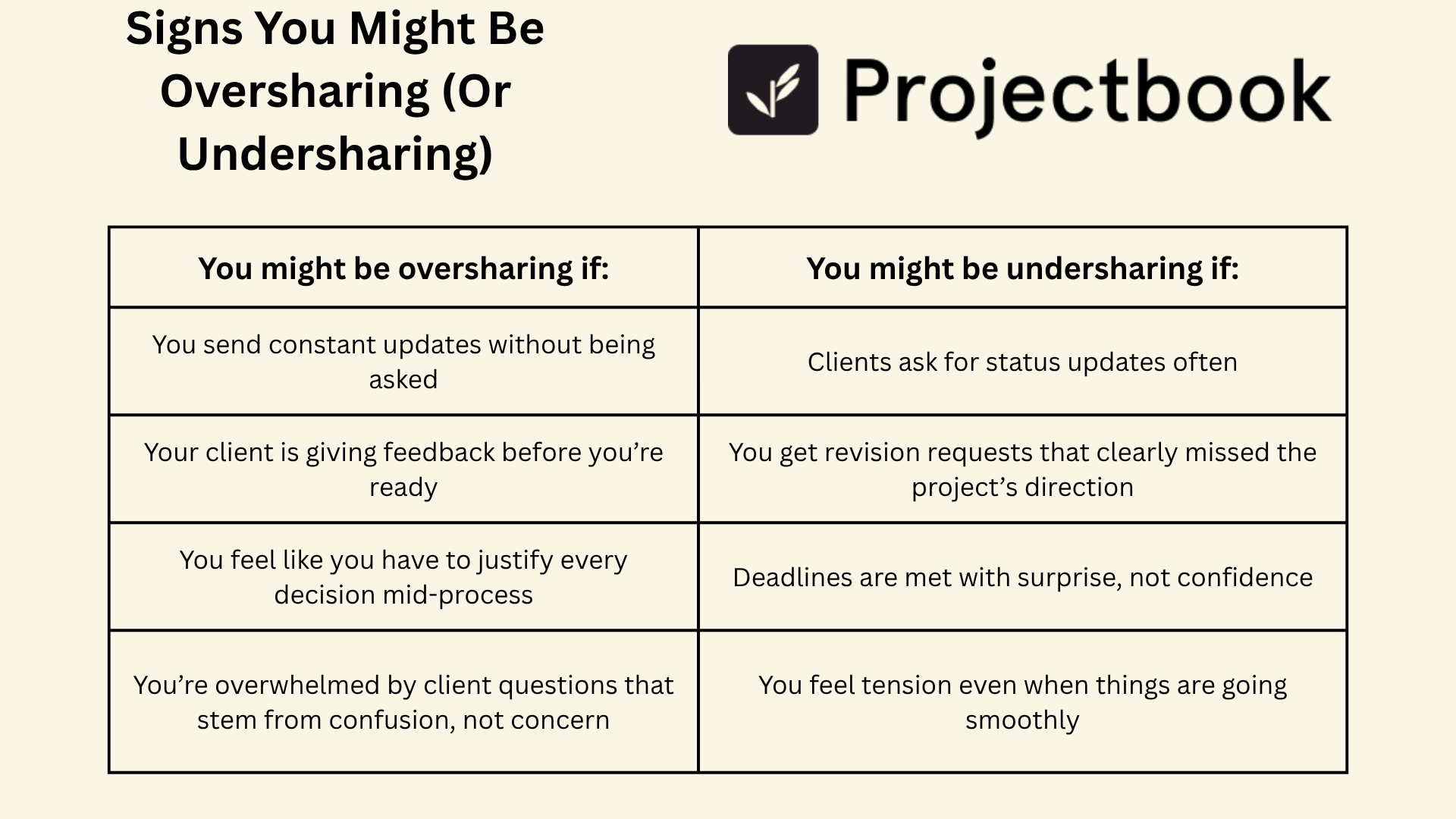
You might be oversharing if:
- You send constant updates without being asked
- Your client is giving feedback before you’re ready
- You feel like you have to justify every decision mid-process
- You’re overwhelmed by client questions that stem from confusion, not concern
You might be undersharing if:
- Clients ask for status updates often
- You get revision requests that clearly missed the project’s direction
- Deadlines are met with surprise, not confidence
- You feel tension even when things are going smoothly
The goal is steady visibility, not constant commentary.
4. What Clients Actually Want to Know
In most cases, clients aren’t trying to micromanage. They just want to feel:
- Confident the work is progressing
- Clear on what stage the project is in
- Prepared for when you’ll need their input
- Reassured that deadlines will be met
You don’t need to send daily messages or explain every tool you use. But a simple update like:
“Just wrapped the outline. Next up: drafting. You’ll see a first version by Friday.”
…can make all the difference.
Transparency isn’t about proving your productivity. It’s about building trust with rhythm.
5. How to Set the Right Level of Visibility
Here are a few simple shifts to help you create project transparency clients love:
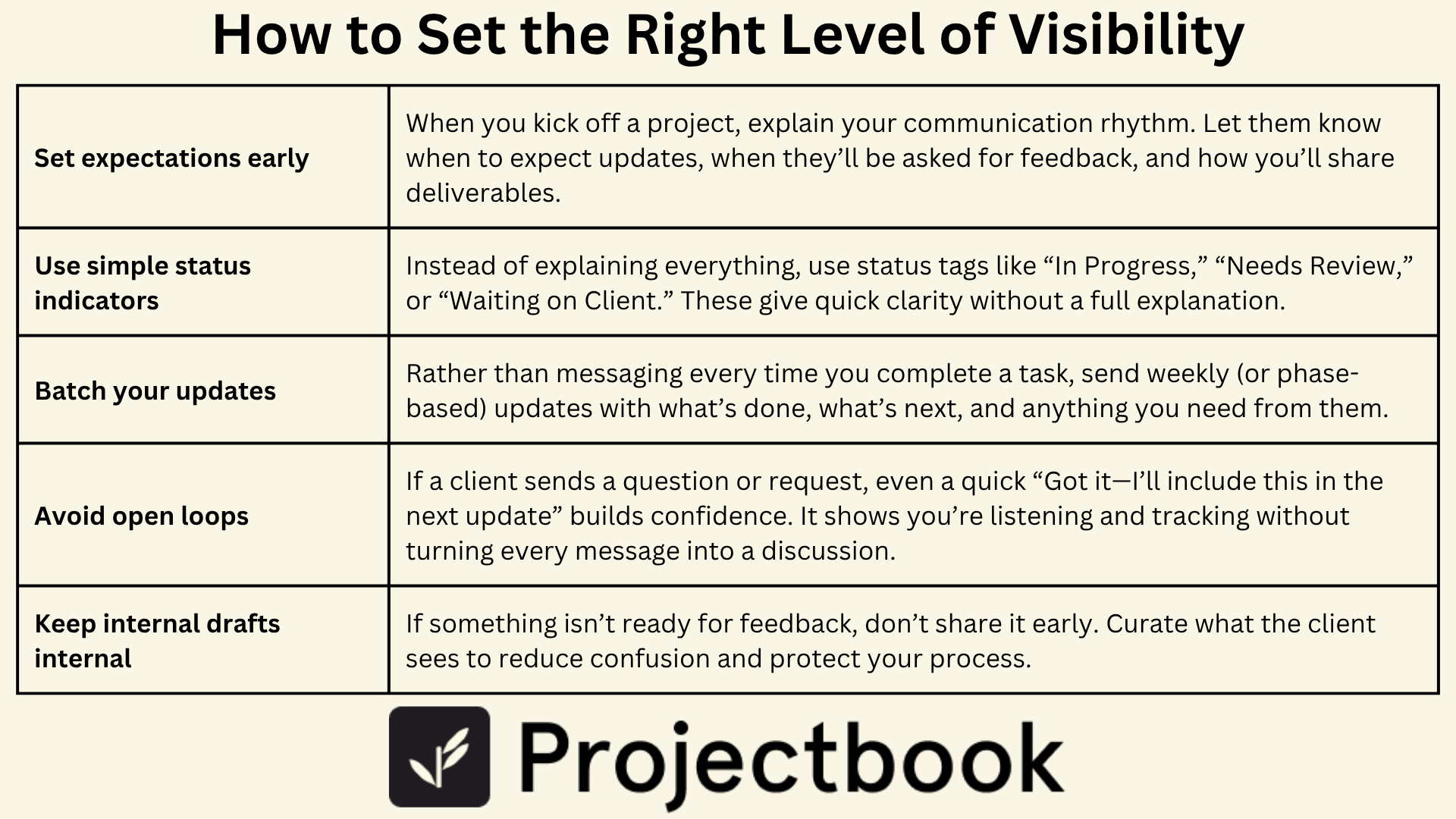
Set expectations early
When you kick off a project, explain your communication rhythm. Let them know when to expect updates, when they’ll be asked for feedback, and how you’ll share deliverables.
Use simple status indicators
Instead of explaining everything, use status tags like “In Progress,” “Needs Review,” or “Waiting on Client.” These give quick clarity without a full explanation.
Batch your updates
Rather than messaging every time you complete a task, send weekly (or phase-based) updates with what’s done, what’s next, and anything you need from them.
Avoid open loops
If a client sends a question or request, even a quick “Got it—I’ll include this in the next update” builds confidence. It shows you’re listening and tracking without turning every message into a discussion.
Keep internal drafts internal
If something isn’t ready for feedback, don’t share it early. Curate what the client sees to reduce confusion and protect your process.
6. How ProjectBook.co Helps You Build Calm, Confident Transparency
ProjectBook was built for freelancers who want to be professional—without feeling like they’re managing a whole agency.
Inside your workspace, you can:
- Share project timelines with status tags that clients can view at a glance
- Attach feedback requests to specific phases (so clients only see what’s ready)
- Track deliverables and approvals in one organized space
- Send simple, templated updates that feel personal, not robotic
- Keep your internal notes separate from client-facing communication
It’s all the clarity your client needs—without oversharing, overscheduling, or over-explaining.
You stay in control of your workflow. They feel looped in, not left out.
7. FAQ: Client Communication & Transparency for Freelancers
Do I have to give clients access to my entire project system?
Not at all. Share what’s helpful—like progress status or key dates. Keep internal drafts, timelines, or creative processes private until they’re ready.
How often should I update a client during a project?
Depends on the scope, but a good rule of thumb is once per major phase, or once per week for ongoing projects.
What if a client starts micromanaging despite clear communication?
Reaffirm the boundaries you set. Gently remind them of the process and why updates are batched for clarity and efficiency.
How does ProjectBook make transparency easier?
It helps you track, organize, and share project updates in one place—so both you and your client can see where things stand, without clogging up your inbox.
From ideas to a clearer week